
New York · for the prosecution
Prosecutor's Toolbox
From the case folder to the paperwork, drafted for the ADA's review.
An ADA adds a case folder. Prosecutor's Toolbox reads every document on the computer and drafts the notices, subpoenas, accusatory paperwork, discovery packet and 30.30 timeline the case needs, each one for the ADA to check, correct and sign.
For New York District Attorney's offices. In use in Rockland County.
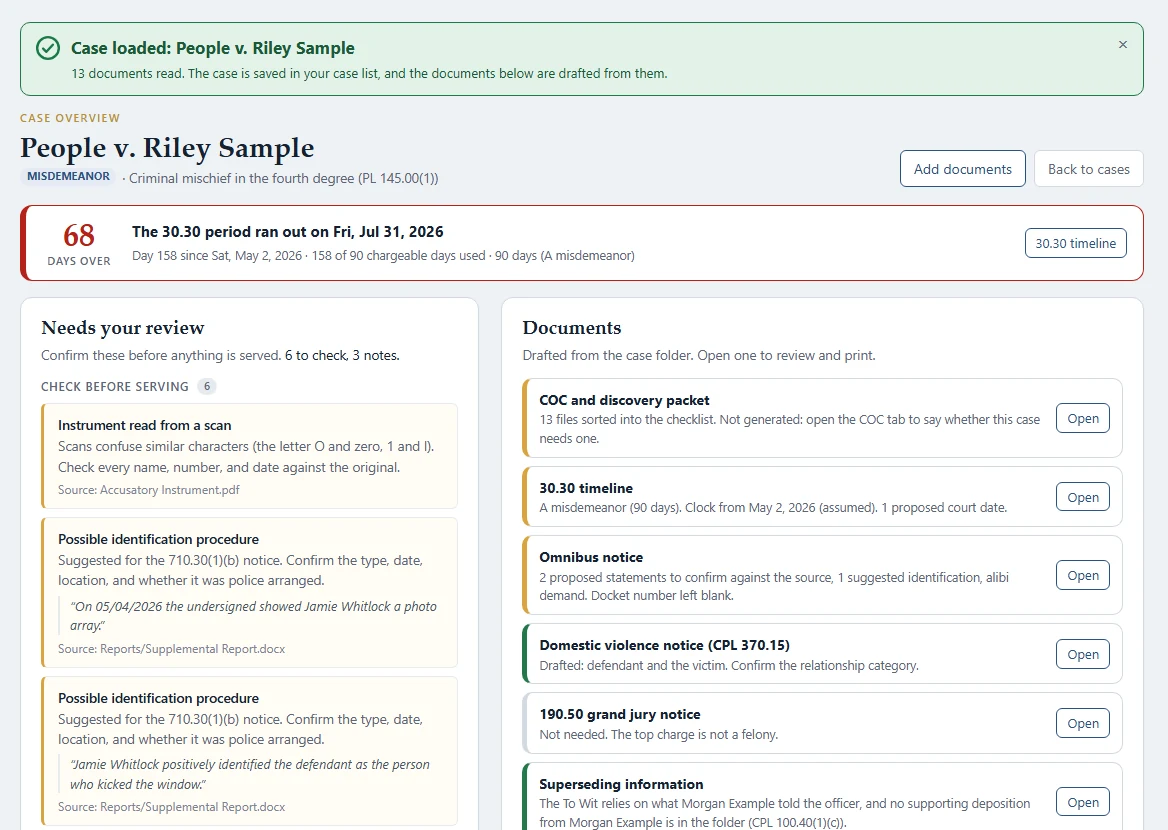
A sample case: the 30.30 clock at the top, what needs the ADA's review on the left, and the documents drafted from the folder on the right.
Reads the whole case folder
Police reports, depositions, scans and photos are read on the computer, including the scanned ones.
Drafts, never decides
Each suggestion shows the sentence and file it came from, and nothing is served until the ADA confirms it.
A 30.30 clock on every case
One CPL 30.30 engine runs the timeline tool and the day count on every case in the library.
Built for your office
Each DA's office gets its own build, with its courts, agencies, seal and forms.
What it does
Everything in Prosecutor's Toolbox
Drafting
- Notices, including CPL 710.30 statement and identification notices
- Subpoenas
- The SSI and supporting deposition, with the full Penal Law and VTL charge catalog
- The certificate of compliance and discovery packet
- Orders of protection on the court's own CRIM-1 and CRIM-2 forms
- Victim contact letters and duty sheets
Felonies and the grand jury
- The office's felony assessment, and a printed felony folder with the case's documents behind it
- For a case marked for the grand jury, each step from presentment to the indictment paperwork, following the office's own Grand Jury Manual
- Once indicted, the office's indictment paperwork filled from the case
The case library
- Every case in a folder on the computer, listed by date or on a month calendar with its day count and 30.30 clock
- A scanned court calendar or instrument becomes cases that get their documents later
- On-call days from the office's monthly calendars, shown on the same calendar
Review before anything goes out
- A "Needs your review" list for each case: what to check before serving, with the source quote and file
- Warnings where a scan may have confused characters, so names and numbers get checked against the original
- Documents are drafts until the ADA prints, signs and serves them
Bryce Bot (optional AI)
- Claude on the office's own Amazon Bedrock in AWS GovCloud, turned on only with the office's approval
- Reads a case and fills it in, checks drafts against the documents, and answers questions in a chat, only when the ADA clicks
- Spoken questions are turned into text on the computer itself
New York law
Built on the statutes you practice under.
Rules come from the official text of New York's statutes. Calculated dates are for attorney review: the text says what the statute says, and how a court applies it stays your call.
- CPL 30.30
- Speedy trial: chargeable days and the timeline
- CPL 710.30
- Notice of statements and identifications
- CPL article 245
- Discovery and the certificate of compliance
- CPL 190.50
- Grand jury notice
- CPL 370.15
- Domestic violence notice
- Penal Law and VTL
- Every offense, with its section, title and class, for the charge selector
For IT
Easy to deploy, quiet on the network.
- Windows desktop app; one installer per office with that office's courts, agencies and forms
- Signed .msi and .exe installers, plus an IT setup guide written for that office
- The case library is a folder on the computer, never a cloud service
- With AI off, the only thing the app sends over the network is its update check
- AI runs only in the office's own AWS GovCloud account, from a CloudFormation template IT reviews
Getting started
Three steps.
- 1
Install it
A signed Windows installer that IT can deploy. Updates reach only licensed offices.
- 2
Add a case folder
Drop the folder in. Every document is read on this computer, including the scanned ones.
- 3
Review and finish
Go through the drafts and the review list, correct what needs it, and print. The ADA decides what goes out.
Questions
Asked often.
Do our case files go to Indictra?
No. Prosecutor's Toolbox reads documents on the ADA's computer and keeps the case library there. Indictra has no server that holds case data.
Is the AI required?
No. Every feature works without it. If the office turns AI on, it runs in the office's own AWS GovCloud account, and only when an ADA clicks.
Can it serve or file anything?
No. It drafts. The ADA reviews, prints, signs and serves.
We're a New York office outside the counties you've built for. Can you set us up?
Yes, that's how it's built: each office gets its own courts, agencies, forms and license. Get in touch and we'll go through what your office uses.
On the other side of the case? Defender's Toolbox is built for criminal defense counsel: retained, assigned and institutional.
See Defender's ToolboxSee Prosecutor's Toolbox on a sample case.
A walkthrough with invented cases, at a time that suits you.